Web Scraping and Data Extraction
Web scraping is a technique used to automatically gather and manipulate web sites information on the user’s behalf and then to export it into a database or an Excel spreadsheet. It is an alternative to manual or customized data extraction procedures which are tedious and error-prone.
What makes web scraping possible?
A wide range of Web resources show information that
is typically a description of objects retrieved from underlying relational
databases and displayed in Web pages following some fixed templates.
In other words most Web pages show already structured data. These data
are formatted for use by people - the relevant content is embedded into
HTML tags. It is natural for HTML tags to inherit and reflect the structure
of the underlying data. Most of the time that structure does not depend
on the actual value of the data fields. Because HTML is an open non-proprietary
standard, page structure can be accessed and parsed by external programs
back to its relational form. That applies to almost any HTML content
generated either by a web server or by a browser engine using JavaScript.
There are alternative Web technologies like Flash and Silverlight that
do not expose the document's model and protect displayed information from
web scraping.
Lists and details
The
images
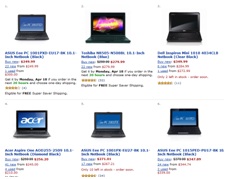
on the right show two examples of structured data objects. The
first image is a Web page segment containing a list of several
products. The description of each product is called a data record.
Such a page is called a list page. When the number of records is too
large to be displayed on one page, list pages are often linked
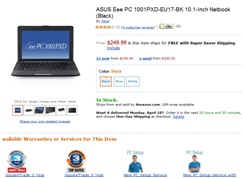
together by a paging control. The second image shows a page segment containing the detailed description of one product.
Such a page is called a detail page. The objective of a web scraping
program is to automatically detect records structure on the list page
and to extract relevant text and images, while discarding irrelevant
material such as HTML tags or advertisements.
Setting up a project
In most cases it is not possible for a program to automatically detect which content is relevant and which is not. To be practical the program has to go through a supervised learning procedure to retrieve data extraction rules from a manually labeled example. Manual labeling requires a user to point to the text and images of interest and select a crawling rule (next page element). The rest can be done automatically by the program, which can detect the template pattern from the manual sample and the web page structure based on tree matching algorithm.
DOM tree parsing and regular expressions
There are many obstacles that a web scraping program has to overcome to extract all data records correctly. Inline frames, dynamically generated content, inline ads, asynchronous page updates, page errors are typical problems that can break data extraction or crawling logic.
To resolve these problems, web scraping programs use a combination of regular expressions matching and DOM tree parsing. Although it is possible to build a DOM model directly parsing HTML text, it is better to retrive it through an embedded web browser, for example, using Internet Explorer ActiveX object. Besides parsing HTML code and generating DOM tree, the embedded browser executes all client-side scripts and communicates with a web server. The only disadvantage of using the embeded browser compared with direct HTML parsing is a relatively slow performance. Regular exressions matching, usually, is efficient only for final refinement, for example, when content to extract is a fragment of the HTML element that cannot be broken down into any subelements.